Permissions
Absolute and Symbolic Modes
The chmod command enables you to modify the permissions of a file or directory. Only the owner of the file or directory or the system administrator can change the permissions of the object. This command has several options and may be configured by using two different modes.
The syntax of the chmod command is chmod [options] {mode} {file/directory name}
The chmod command supports different options to modify permissions. One or more of these options may be used at a time.
| Option for the chmod Command | Purpose |
|---|---|
| -c | Report changes that are made in permissions |
| -f | Hide most error messages |
| -v | Display a diagnostic entry for every file processed |
| -R | Modify permissions of files and directories recursively |
The chmod command has two different syntaxes for setting permissions: absolute mode and symbolic mode. Both approaches provide the same results. Some administrators find one approach more logical than the other, and it does not really matter which is used. Sysadmins should understand and be able to use both modes.
Absolute Mode
Absolute mode uses octal (base-8) numbers to specify permissions. Each permission (r/w/x) has an associated number.
Absolute mode octal values:
- Read = 4
- Write = 2
- Execute = 1
By adding the octal numbers for the permissions you want to grant, you get the overall permission number to assign to a directory or file. For example, full permissions (read, write, and execute) are equivalent to 4 + 2 + 1, or 7. Read and write permissions are equivalent to 4 + 2, or 6. Complete permissions are expressed as a three-digit number, where each digit corresponds to the owner, the group, and others, respectively.
In absolute mode, the syntax of the chmod command is chmod {number}
Three-digit and Four-digit Modes
When written in octal, numeric format, file permissions typically have three digits, with each digit corresponding to the user, group, and others permissions. However, file permissions may also be written with four digits, with the new, leading digit signifying any advanced permissions to be defined (or 0, for none). For example, the permissions for a non-executable file in Linux might be rw-rw-r--, or 664. This is equivalent to the octal format of 0664.
Symbolic Mode
Symbolic mode enables you to set permissions using three components, namely:
- Permission contexts: u/g/o/a (a applies the permissions to all three contexts)
- Permission operators: +/-/=
- Permission attributes: r/w/x
Permission operators determine whether a permission is to be granted or removed.
The operator + (plus sign) grants permissions. The operator - (minus sign, or hyphen) denies permissions. Operator = (equal sign) assigns permissions exactly as provided, rather than being additive or subtractive.
In symbolic mode, the syntax of the chmod command is: chmod {access context}{operators}{permission attributes}
As an example, to add read and write permissions to myfile for the owner and the group: chmod u+rw,g+rw myfile
| Permission | Absolute Mode | Symbolic Mode |
|---|---|---|
| User has read-write-execute; Group has read and execute; Others have read and execute; |
755 | u=rwx,g=rx,o=rx |
| User has read-write-execute; Group has no permissions; Others have no permissions; |
700 | u=rwx,g=,o= |
| User has read and write; Group has write; Others have write; |
622 | u=rw,g=w,o=w |
| User has read and write; Group has no permissions; Others have no permissions; |
600 | u=rw,g=,o= |
| User has read and write; Group has read; Others have no permissions; |
640 | u=rw,g=r,o= |
While sysadmins tend to prefer one mode or the other, it is worthwhile to understand both modes. Documentation, online resources, and other administrators may provide permissions settings using either mode, so you must be able to interpret whichever mode is presented.
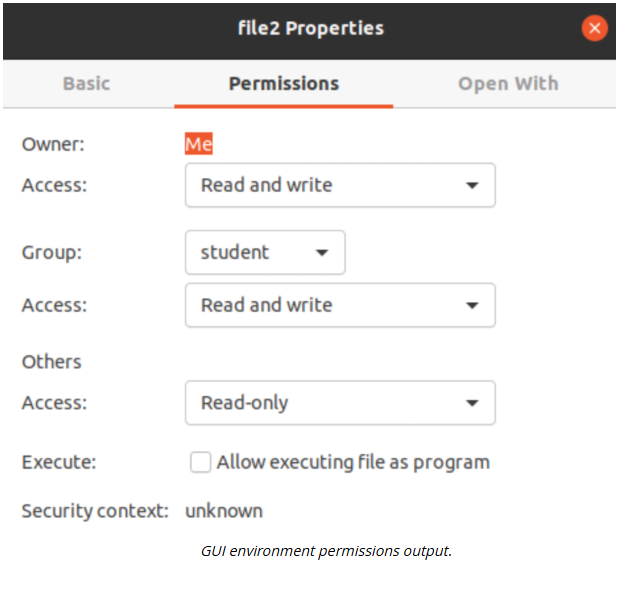
Set Permissions in a GUI
In most GUI desktop environments, right-click a file or directory, select Properties, and select the Security tab. Check the appropriate permissions boxes for the identity and access level you wish to set.
Electric Meatball's Digital Garden Home
User and Group Permissions Cheat Sheet