Pi-Hole🥧🕳️ Setup
This is how to setup a pihole on your home network.
The tutorial can be found on the Pihole official site.
1. Install a supported operating system

You can run Pi-hole in a container, or deploy it directly to a supported operating system via our automated installer.
Docker install
Supported operating systems
2. Install Pi-hole

Our intelligent, automated installer asks you a few questions and then sets everything up for you. Once complete, move onto step 3.
3. Use Pi-hole as your DNS server
Configure your router’s DHCP options to force clients to use Pi-hole as their DNS server, or manually configure each device to use the Pi-hole as their DNS server.
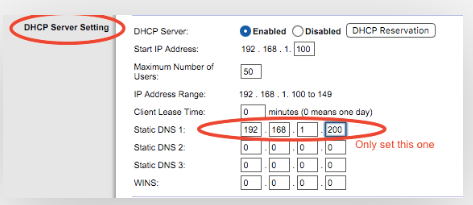
Use Pi-hole as your DNS server
It's best to use a physical connection such as an Ethernet cable when connecting the Pi to your router, to avoid interference and disconnections. If you have no other options on the host device, WiFi should work too.
4. Block ads everywhere, even on the go
By pairing your Pi-hole with a VPN, you can have ad blocking on your cellular devices, helping with limited bandwidth data plans.

There is a Super Cool LCARS Theme for all you Star Trek Geeks
What is Star Trek's LCARS?

The Pi-hole team

Electric Meatball's Digital Garden Home
Linux Terminal Cheat Sheet
The OSI Model
The TCP IP Model
The Magical art of subnetting